That old Android in your drawer is a fully capable security camera. It has a lens, a microphone, night mode, and a data connection. It just needs the right app. Here's how to set it up today — for free.
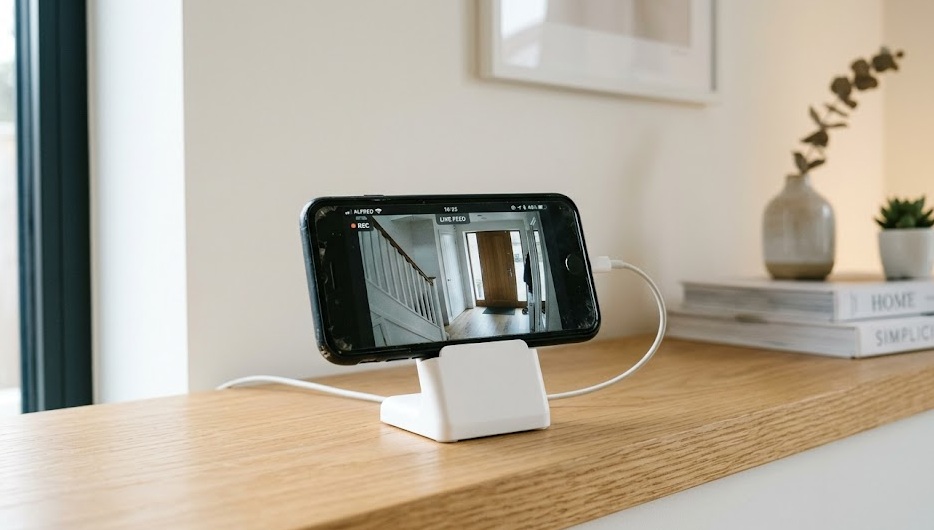
Any phone running Android 5.0+ or iOS 12+ can become a security camera. Install Alfred Camera (free, 70 million+ users) on the old phone and on your main phone. Sign into the same account on both. Assign one as Camera, one as Viewer. That's it. Setup takes under 10 minutes. Monthly cost: $0.
The barrier is lower than you think. Most phones made after 2016 qualify. Here's the minimum checklist:
| Requirement | Minimum | Why It Matters |
|---|---|---|
| Android version | Android 5.0 (Lollipop) | Required by all major security apps |
| iOS version | iOS 12 | Minimum for Alfred, Presence, AtHome |
| Wi-Fi connection | 2.4 GHz or 5 GHz | Needed for live streaming and alerts |
| Free storage | 500 MB minimum | App install and local clip buffer |
| Power source | Plugged in recommended | Running as a camera drains battery in 3–5 hours |
| Camera | Any rear or front lens | Rear camera gives better resolution and low-light |
The phone must stay connected to Wi-Fi when the screen is off. On Android: Settings → Wi-Fi → Advanced → "Keep Wi-Fi on during sleep" → set to Always. Without this, the camera goes offline when the display turns off and misses every alert.
Not all apps work the same way. Here's what each one does well — and where each one falls short.
Used by 70 million+ people worldwide. Free plan includes live view, motion alerts, 7-day cloud clips, two-way audio, and a siren. Works across Android and iOS. Setup takes 3 minutes. The free tier is genuinely complete — most people never need to upgrade.
Records directly to your Google Drive. No subscription fees for storage — it uses your existing Drive quota. Motion-triggered recordings only. Less polished UI, but no monthly bill. Ideal if you already pay for Google One storage.
Supports up to 4 cameras on the free plan. Motion zones let you ignore traffic in the background and only alert on your doorway. Clean interface. Available on both Android and iOS. Strong choice for covering multiple rooms.
Smart recording triggers: only records when you leave home, using your main phone's location. Good motion sensitivity controls. Free plan supports one camera. Strong on iOS. Older interface but very reliable over long periods.
iOS exclusive. Free plan includes cloud storage — rare for a no-cost security app. Motion detection, live streaming, two-way audio, all in one place. Designed specifically for repurposing spare iPhones. If you have two iPhones, this is the cleanest option.
Stores footage locally — no cloud required. All recordings stay on your phone or NAS drive. No third-party servers see your footage. Advanced motion sensitivity and scheduling. Requires slightly more setup but gives you full ownership of your data.
Alfred is the fastest starting point. Here's the exact process from drawer to live view.
Factory reset the device if it has been sitting unused. This clears memory-hogging apps and frees storage. Keep it signed into a Google or Apple ID — you will need it to install Alfred from the app store.
Search "Alfred Camera" in the Google Play Store or Apple App Store. Install on the old phone (this becomes the camera). Install on your current phone (this becomes the viewer). Open Alfred on both devices.
Alfred uses Google Sign-In. Use the same Google account on both phones. The app links them automatically. No pairing codes, no manual configuration needed.
Alfred asks each device: "Is this a Camera or a Viewer?" Select Camera on the old phone. Select Viewer on your main phone. The live feed appears on your main phone within seconds.
In Alfred settings on the old phone, tap Motion Detection and turn it on. Start with Medium sensitivity. Adjust down if you get too many false alerts from shadows, fans, or passing cars outside a window.
Place the old phone on a stand or a small phone mount. Plug it into a charger. Position it toward your entry point or the area you want to monitor. The camera runs indefinitely while plugged in.
Alfred's Screen Off Mode keeps the camera streaming in the dark without the screen glowing. Enable it under Camera settings → Display. The phone still sends motion alerts and records clips — the screen just stays off so it does not light up the room or drain extra battery at night.
Placement determines whether you catch what matters or just record the ceiling. Three locations give you the most value.
Mount at 6–8 feet high, angled down 15–20 degrees. Captures faces at eye level. Covers the entry point better than a peephole camera at zero additional cost. This is the highest-value placement for most homes.
Corners give the widest diagonal coverage. A phone in a high corner at a 45-degree angle covers most of a medium-sized room with one camera. Keep it away from windows — backlight from outside blows out the image and makes faces unrecognizable.
Place the phone on a shelf or cabinet facing the door. Avoid pointing through glass at night — infrared reflects off glass and the image turns white. For outdoor monitoring through a window, dedicated outdoor cameras perform better.
Do not point directly at a window or bright light source — the backlight exposure ruins the image. Do not let the battery cycle between 0% and 100% repeatedly. Running on empty repeatedly degrades an old battery in weeks. Keep it plugged in 24/7 once it is set up as a permanent camera.
| Feature | Alfred Free | Alfred Premium (~$3.99/mo) | Dedicated Camera (Wyze v4 — $34.99) |
|---|---|---|---|
| Live streaming | Yes | Yes | Yes |
| Motion alerts | Yes | Yes | Yes |
| Cloud recording | 7-day event clips | 30-day full history | 14-day event clips (free) |
| Two-way audio | Yes | Yes | Yes |
| Night vision | Software only | Software only | Infrared LED (true night vision) |
| Motion zones | No | Yes | Yes |
| Siren | Yes | Yes | No |
| Total year-1 cost | $0 | $47.88/yr | $34.99 (no subscription) |
The free tier handles most use cases. Upgrade to Premium only if you need motion zones or a longer recording history. At $3.99/month, Alfred Premium costs $47.88/year — more than a Wyze Cam v4 hardware purchase. If night vision through glass is critical, a dedicated camera is the better investment.
For most people: start with the free Alfred setup. Use what you already own. Upgrade to hardware later only if you find a gap that the phone camera cannot fill.
Alfred Camera is free, takes 10 minutes, and works on any phone made in the last 8 years. No monthly fees. No new hardware to buy.
Get Alfred Camera Free →