Over 135 million projects. Over 100 million registered users. Scratch is the world's most popular first coding language — and you can start building something real in under 30 minutes.
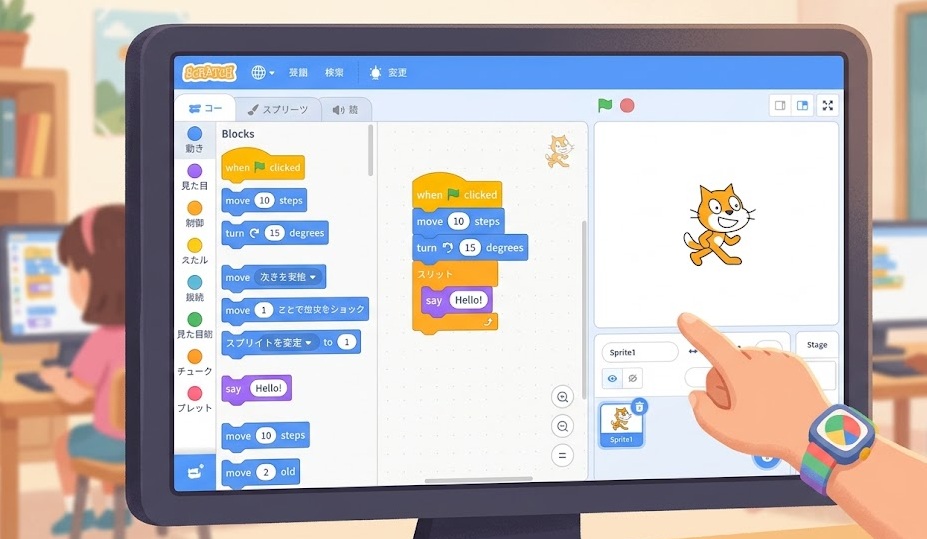
Scratch is a free, visual block-based programming language made by MIT. Instead of typing code, you drag colorful blocks together to build games, animations, and interactive stories. It runs in your browser at scratch.mit.edu — no download required. Scratch teaches real programming logic: loops, conditions, variables, and events. It is designed for ages 8–16 but is used by learners of all ages worldwide.
Scratch was created in 2003 at the MIT Media Lab. The team had one goal: make programming accessible to children who had never coded before.
They solved the biggest beginner problem — syntax errors. In traditional coding, one misplaced comma breaks everything. Beginners spend hours debugging punctuation instead of learning logic.
Scratch removed that barrier entirely. Every instruction is a block. Blocks snap together like puzzle pieces. If a block doesn't fit, it simply won't connect. You cannot make a syntax error.
The result: learners spend 100% of their time on logic — what they actually want to learn — instead of fighting syntax.
As of 2025, over 135 million projects have been shared on scratch.mit.edu. The platform has users in every country on Earth. It is completely free, with no ads and no premium tier.
Scratch is not a toy. The range of projects on the platform is wider than most people expect.
Platformers, maze runners, clickers, Pong clones, Flappy Bird remakes. Basic collision detection and score tracking work natively in Scratch.
Characters that respond to keyboard and mouse input. Stories where the viewer makes choices. Visual art that changes in real time.
Quizzes that track scores. Flashcard apps. Math drill programs. Teachers build these in Scratch to use in classrooms worldwide.
Generative art that draws patterns from code. Music sequencers. Beat makers. Scratch has built-in sound support and drawing tools.
Physics simulations, bouncing particles, gravity models. Advanced Scratch users have built working calculators and basic 3D projection engines.
Branching narrative games. Comic-style panels with dialogue. Choose-your-own-adventure formats with multiple endings.
Scratch cannot build mobile apps, websites, or desktop software you install. It runs in a browser sandbox. For those goals, you will eventually need a text-based language. But as a learning platform, nothing beats it for the first 6–12 months of coding.
Every major concept in professional programming has a Scratch equivalent. The difference is how it looks — not what it does.
| Concept | In Scratch | In Python / Java |
|---|---|---|
| Variables | "Make a Variable" block | score = 0 |
| Loops | "Repeat 10" or "Forever" block | for i in range(10): |
| Conditionals | "If / Else" block | if score > 10: |
| Events | "When green flag clicked" block | Event listeners / callbacks |
| Functions | "My Blocks" (custom blocks) | def my_function(): |
| Lists | "Make a List" block | my_list = [] |
| Broadcasts | "Broadcast message" block | Event emitters / pub-sub patterns |
Every concept you learn in Scratch transfers directly to every text-based language. You are not learning a dead-end toy. You are learning the mental model that all programming is built on.
People ask: "Is Scratch a real language?" The better question is: "What does Scratch prepare you for?"
Here's the honest comparison:
| Scratch | Python / JavaScript | |
|---|---|---|
| Syntax errors possible | No | Yes |
| Runs in browser | Yes, natively | Needs setup or IDE |
| Can build web apps | No | Yes |
| Can build mobile apps | No | Yes (with frameworks) |
| Learning curve | Very low | Moderate |
| Core logic concepts | All covered | All covered |
| Job market use | None | High |
| Best for | First 6–12 months | Month 6 onward |
Scratch is a bridge. It is not the destination. The goal is to build enough confidence and understanding in Scratch that switching to a text-based language feels like a translation — not a rebuild.
No account required to try. No download. No setup. Here's the exact path for a first-time user.
Click "Start Creating" in the top navigation. The editor opens in your browser. You see a stage (where your project runs) and a block palette on the left.
Click "Motion" in the category list. Drag the "Move 10 steps" block to the empty script area. Click it. Your cat sprite moves 10 pixels. That's your first program.
Click "Events." Drag "When green flag clicked" above your move block. Click the green flag above the stage. The cat moves automatically when you start the project.
Click "Control." Wrap a "Forever" block around your move block. Click the flag. The cat walks across the screen continuously. Add a "If on edge, bounce" block from Motion. Now it bounces back.
Create a free account to save your project. Click "Share" to publish it. Every published project gets a unique URL you can send to anyone.
MIT's official Scratch Educator Guide at scratch.mit.edu/educators covers structured projects for beginners. CS First by Google (csfirst.withgoogle.com) offers free guided Scratch courses with videos. Both are completely free.
When Scratch starts feeling limited — when you want to build something it can't do — you're ready. That's the right moment to switch.
The most natural next step. Python's clean syntax reads almost like spoken English. Every Scratch concept maps directly. Start with Python + Pygame if you want to keep building games.
If websites interest you, JavaScript is the language of the browser. Harder than Python at first, but you see results immediately — your code runs in a web page.
If 3D games are the goal, skip Python and go straight to C# with Unity. Unity is the industry standard for indie game development. Scratch concepts translate — the syntax is just more rigid.
If a computer science curriculum is your path — university courses, AP Computer Science — Java is usually the required language. Start here if an exam or course demands it.
Start at scratch.mit.edu — free, no download, no account required. Build your first moving sprite in 5 minutes. Come back when Scratch feels too small.
Open Scratch Now