Cracked Dell Laptop Screen: Your Repair Options Explained
From a hairline fracture to a completely shattered panel — here's what it actually costs and what to do first.
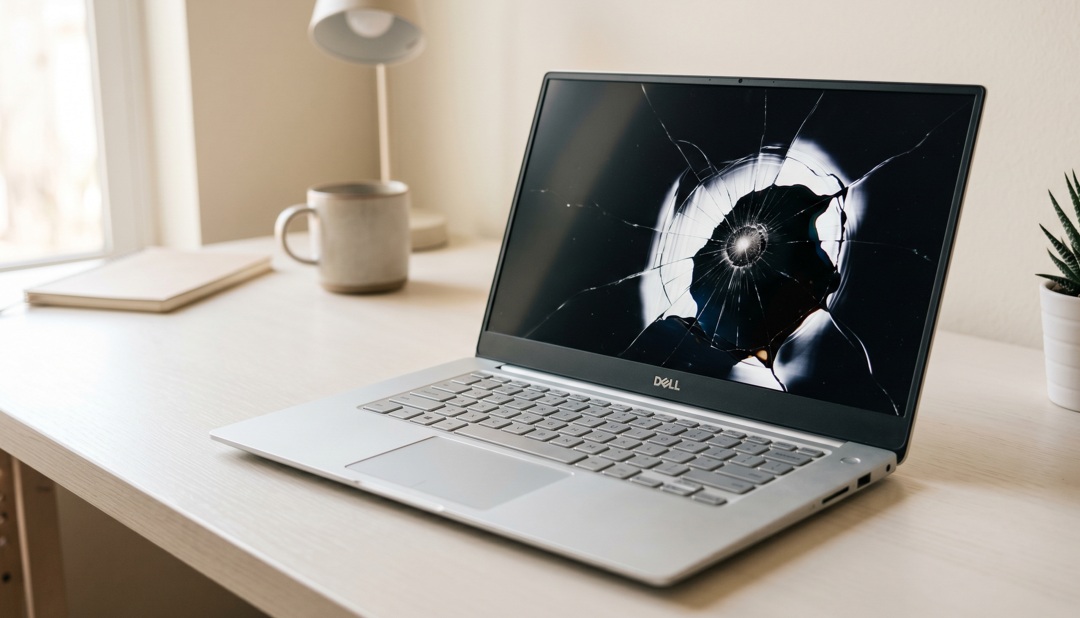
A cracked Dell laptop screen is not covered by standard warranty — you need Dell's Accidental Damage Protection (ADP). Repair costs range from $100–$350 depending on model. Third-party shops are often 40% cheaper and use compatible panels that work fine.
What's in this guide
Damage Diagnosis Table
You dropped your bag, closed the lid too hard, or it just happened. Before deciding anything, figure out what actually broke.
| Symptom | Likely Damage | Fix Difficulty |
|---|---|---|
| Hairline crack, display works | Glass/bezel only | Easy |
| Black blob or ink-spread pattern | LCD panel cracked internally | Medium — replace panel |
| Half the screen is black | Panel damage near backlight | Medium |
| Screen works but has lines | Flex cable or panel damage | Medium |
| Completely dark, backlight glow visible | Panel dead, GPU likely fine | Medium — new panel |
| No display at all, no glow | Panel + possibly GPU/cable | Hard — needs diagnosis |
What's Happening Inside the Panel
Dell laptops use IPS or TN LCD panels (or OLED on premium models). When you crack the panel, you're usually breaking the liquid crystal layer — the actual light-filtering matrix. That's why you see those distinctive "ink blob" spreading patterns: liquid crystal leaking between layers under pressure.
Here's the thing most people don't realize: the display you see is three layers bonded together — the back panel with the LCD matrix, a diffuser layer, and the touch digitizer (on touchscreen models). A crack in any one of them means the whole assembly usually needs replacing. Individual layer repair isn't practical outside of a factory.
If an external monitor works fine when plugged into your Dell via HDMI, the GPU and video output are confirmed healthy. You only need a screen replacement, not a motherboard repair.
Immediate Steps to Take
Step 1: Connect an external monitor. Plug an HDMI cable into your Dell and connect it to any TV or monitor. If video shows up, your GPU is fine. You're confirmed looking at a screen-only problem. This takes 2 minutes and rules out the most expensive scenario.
Step 2: Find your Dell Service Tag. It's on the bottom of the laptop (a 7-character alphanumeric code). Go to dell.com/support, enter it, and check whether you have ADP (Accidental Damage Protection). If you do, repair may cost only $0–$99.
Step 3: Don't close the lid with extra force. A cracked panel can shatter completely if pressure is applied. If the laptop must be moved, support the screen and avoid flexing it.
When you connect an external monitor via HDMI, does it show a picture?
Repair Options & Real Costs
| Option | Cost Range | Turnaround | Notes |
|---|---|---|---|
| Dell ADP (warranty claim) | $0–$99 | 3–5 days | Must have active ADP coverage |
| Dell out-of-warranty | $200–$400+ | 5–10 days | Genuine parts, official repair |
| Third-party repair shop | $100–$220 | Same day – 2 days | Compatible panels, usually fine |
| DIY panel replacement | $50–$120 (parts) | 1–2 hours | YouTube guides exist for most models |
According to iFixit's repairability scores, most Dell XPS and Inspiron models have a 7/10 or 8/10 repair score[source], meaning screen replacements are realistic DIY projects for confident users. The XPS 15 is more challenging; the Inspiron line is straightforward.
What Not to Do
1. Don't use the laptop on your lap if the crack is spreading. Body heat accelerates LCD bleeding.
2. Don't try to fix the crack with tape on the display surface. It leaves adhesive residue that makes the panel unusable.
3. Don't buy a replacement panel without verifying the exact model number. Dell uses different panel suppliers for the same laptop model in different production batches.
4. Don't assume third-party repair voids your warranty on other components. Under the Magnuson-Moss Warranty Act (US), replacing one part doesn't void coverage on unrelated components.
When Replacement Makes More Sense Than Repair
- The laptop is 4+ years old and other issues exist (battery life, keyboard)
- Repair cost exceeds 50% of a comparable refurbished model
- The screen is a touchscreen OLED — replacements can cost $400+ alone
- The motherboard may also be damaged (no external display output)
What to Do — Step by Step
If You Only Do One Thing
Find your Dell Service Tag (bottom of laptop) and check your warranty status at dell.com/support right now. It takes 90 seconds. If you have Accidental Damage Protection, you're looking at a near-free repair. If you don't, at least you know where you stand before spending time on other research.
People Also Ask
Standard warranty does not cover accidental damage. Dell's Accidental Damage Protection (ADP) does — check your Service Tag at dell.com/support to see if it's active.
Without ADP, Dell charges $200–$400+ out-of-warranty. Third-party repair shops typically charge $100–$220 using compatible replacement panels.
Yes, for most Inspiron and Latitude models. iFixit has guides and scores most Dell laptops 7/10 or higher for repairability. The XPS line is harder due to thin bezels.
With ADP, 3–5 business days. Out-of-warranty through Dell, 5–10 days. A local third-party shop can often complete it the same day.