One goes farther. One goes faster. Most people connect everything to the wrong one — and wonder why their video calls stutter and their smart lights drop off daily.
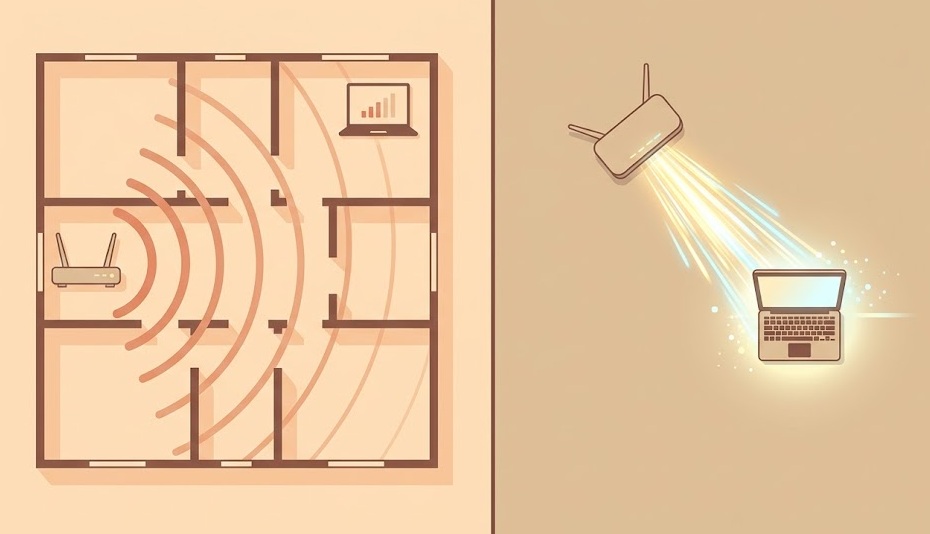
5GHz: laptops, streaming devices, gaming consoles, desktop computers — anything close to the router that needs speed.
2.4GHz: smart home devices, security cameras, anything far from the router, anything with low bandwidth needs.
Rule of thumb: if you can see the router, use 5GHz. If you're in a different room, use 2.4GHz.
Think of 2.4GHz as a city bus route. It covers a lot of ground. It's slower. A lot of other people are on it.
5GHz is a highway. You get there faster. But the on-ramp is close — you can only use it within range.
Neither is better. They solve different problems. A dual-band router broadcasts both at the same time. The goal is putting each device on the right band.
Spec sheets show maximum theoretical speeds under perfect lab conditions. Real-world results are different. Here's what to actually expect.
The 5GHz speed advantage only applies when you're close to the router. At 80+ feet with walls between you and the router, 5GHz can actually deliver less speed than 2.4GHz — because the signal weakens to the point where the connection drops to lower-speed modulation modes.
If your internet plan delivers 200 Mbps, it doesn't matter whether you're on 2.4GHz or 5GHz for most tasks — both exceed your connection speed. The band difference matters most in your local network: transferring files between devices, streaming from a local media server, or gaming where latency rather than raw throughput is the issue.
The 2.4GHz band is crowded. Not just with your neighbors' Wi-Fi networks — everything uses it.
The 2.4GHz band only has 3 non-overlapping channels (1, 6, and 11). Every device in your building is competing for these same 3 lanes.
The 5GHz band has 24 non-overlapping channels in the US. Fewer devices use it. Less competition. This is why 5GHz often feels faster even at the same physical distance — it's not just raw speed, it's a cleaner channel.
If your 2.4GHz network feels slow, log into your router admin panel and manually set the channel to 1, 6, or 11 — whichever is least congested in your area. Use a free tool like WiFi Analyzer (Android) or Wireless Diagnostics (Mac) to scan which channels your neighbors are on.
| Device | Best Band | Why |
|---|---|---|
| Laptop (near router) | 5GHz | High bandwidth for browsing, calls, downloads |
| Laptop (far from router) | 2.4GHz | Better signal through walls at distance |
| 4K streaming device | 5GHz | 4K needs 25+ Mbps sustained — 5GHz delivers it reliably |
| Gaming console | 5GHz or Ethernet | Low latency; 5GHz has less congestion than 2.4GHz |
| Smartphone (in same room) | 5GHz | Speed and low latency for video calls and streaming |
| Smartphone (far away) | 2.4GHz | Better range and signal stability |
| Smart TV | 5GHz | Streaming requires consistent bandwidth |
| Smart plugs / switches | 2.4GHz | Tiny data needs; spread across the house; range matters more |
| Security cameras | 2.4GHz | Often mounted far from router; range is priority |
| Smart thermostat | 2.4GHz | Very low bandwidth needs; reliability over speed |
| Wireless printer | 2.4GHz | Low throughput needs; 2.4GHz handles it fine |
| Desktop PC | Ethernet preferred, or 5GHz | Stationary + high bandwidth = wired is best; 5GHz is second |
Band Steering (sometimes called Smart Connect) uses one SSID for both bands and automatically assigns each device to the best frequency. It's not perfect — older devices sometimes prefer 2.4GHz even when 5GHz would be better — but it handles most situations automatically without you managing two separate network names.
Wi-Fi 6 (802.11ax) improves performance on both existing bands. Faster speeds, better handling of many simultaneous devices, improved efficiency in congested environments. Most new routers sold after 2020 support Wi-Fi 6.
Wi-Fi 6E adds a third band at 6GHz. It's faster than 5GHz and almost interference-free — so few devices currently use 6GHz that you essentially get a private highway. The tradeoff: even shorter range than 5GHz, and both your router and device must support Wi-Fi 6E.
| Standard | Bands | Max Speed | Best For |
|---|---|---|---|
| Wi-Fi 5 (802.11ac) | 2.4GHz + 5GHz | 3.5 Gbps | Most home networks today |
| Wi-Fi 6 (802.11ax) | 2.4GHz + 5GHz | 9.6 Gbps | Dense device environments, future-proofing |
| Wi-Fi 6E | 2.4GHz + 5GHz + 6GHz | 9.6 Gbps | High-speed devices very close to router |
| Wi-Fi 7 (802.11be) | 2.4GHz + 5GHz + 6GHz | 46 Gbps | Cutting edge — limited device support as of 2026 |
If your router is more than 5 years old, upgrading to a Wi-Fi 6 router often delivers more noticeable improvement than obsessing over band selection — especially in households with 10+ connected devices.
Got both bands sorted? The next step is checking your router settings and security protocol.
Browse All Guides →